

Delving into the realm of managing digital eye strain at home, this article aims to provide valuable insights and practical solutions to alleviate eye discomfort caused by excessive screen time.
Exploring the impact of prolonged screen exposure on eye health and the significance of adopting effective measures to combat digital eye strain.
Understanding Digital Eye Strain
Digital eye strain, also known as computer vision syndrome, refers to the discomfort or eye-related issues that result from prolonged use of digital devices such as computers, smartphones, and tablets. Common symptoms include eye fatigue, dryness, redness, blurred vision, headaches, and neck or shoulder pain.Prolonged screen time contributes to digital eye strain due to factors like staring at screens for extended periods without breaks, improper lighting, poor posture, and uncorrected vision problems.
The blue light emitted from screens can also affect the eyes and disrupt sleep patterns.Managing digital eye strain is crucial for overall eye health as it can prevent more serious conditions from developing. By taking steps to reduce eye strain, such as adjusting screen settings, practicing the 20-20-20 rule (taking a 20-second break every 20 minutes to look at something 20 feet away), and ensuring proper lighting and ergonomics, individuals can protect their eyes and maintain good vision.
Creating an Ergonomic Workspace
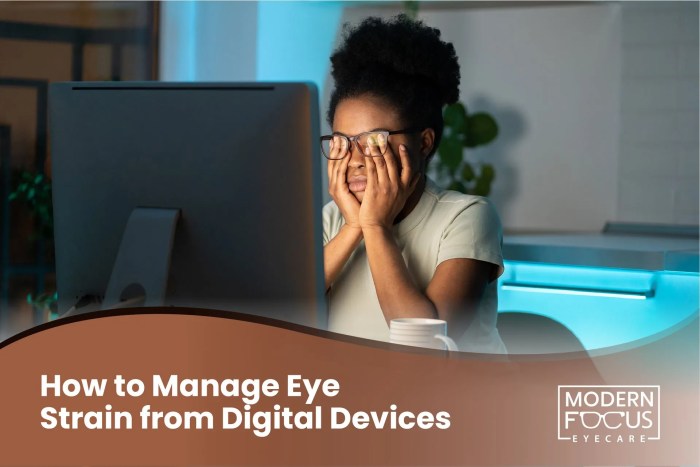
Setting up a comfortable desk and chair for screen use is crucial in reducing digital eye strain. Proper lighting and monitor positioning also play a significant role in maintaining optimal eye health.
Tips for Setting up a Comfortable Workspace:
- Choose a desk and chair that allow you to sit comfortably with your feet flat on the floor and your knees at a 90-degree angle.
- Position your computer screen at eye level to reduce strain on your neck and eyes.
- Place your keyboard and mouse within easy reach to avoid unnecessary stretching or straining.
Importance of Proper Lighting:
- Avoid glare on your screen by positioning your monitor perpendicular to windows and using curtains or blinds to control natural light.
- Adjust the brightness and contrast of your screen to a comfortable level that suits your eyes.
- Consider using a desk lamp with a warm light to reduce strain on your eyes in low-light conditions.
Positioning the Monitor Correctly:
- Keep your monitor at arm's length away from your eyes to reduce eye strain.
- Position the top of your screen at or slightly below eye level to prevent neck strain.
- Avoid screen glare by adjusting the tilt of your monitor to eliminate reflections from overhead lighting.
Implementing the 20-20-20 Rule
The 20-20-20 rule is a simple yet effective strategy to manage digital eye strain. The rule suggests that for every 20 minutes spent looking at a screen, you should take a 20-second break and look at something 20 feet away.
By following this rule, you give your eyes a chance to rest and refocus, reducing the strain caused by prolonged screen time.
Activities during the 20-second breaks:
- Look out of a window to a distant object
- Stretch your body and blink frequently
- Close your eyes and practice deep breathing exercises
- Stand up and walk around for a few moments
Effectiveness of the 20-20-20 Rule:
The 20-20-20 rule is highly effective in preventing eye fatigue and reducing the symptoms of digital eye strain. By incorporating regular breaks into your screen time, you allow your eyes to relax and maintain their natural focus, leading to decreased strain and discomfort.
Adjusting Display Settings
Adjusting display settings can play a significant role in reducing digital eye strain. By making simple changes to brightness, contrast, and other settings, you can create a more comfortable viewing experience for your eyes.
Setting up Blue Light Filters or Night Mode
One effective way to reduce eye strain is by setting up blue light filters or night mode on your devices. Blue light emitted by screens can disrupt your sleep patterns and cause eye fatigue. By enabling these features, you can reduce the amount of blue light exposure, making it easier on your eyes.
Using Larger Fonts and Reducing Glare
Another helpful tip is to adjust your display settings to use larger fonts and reduce glare on screens. Larger fonts can make text easier to read, reducing the strain on your eyes
Practicing Eye Exercises
Eye exercises are a great way to relieve strain and improve focus, especially after long hours of staring at screens. Regular eye breaks and stretching can significantly contribute to overall eye health, reducing the symptoms of digital eye strain.
The Importance of Eye Exercises
- Eye exercises help to relax the eye muscles and improve blood circulation to the eyes.
- They can reduce eye fatigue and dryness by encouraging blinking and lubricating the eyes.
- Practicing eye exercises regularly can enhance focus and concentration, benefiting overall productivity.
Simple Eye Exercises to Try
- Palming: Rub your palms together to generate heat and place them gently over your closed eyes. Hold for a few seconds to relax your eye muscles.
- Eye Rolling: Slowly roll your eyes in a circular motion, first clockwise and then counterclockwise. This helps to stretch and exercise the eye muscles.
- Focusing: Hold a pen at arm's length and focus on it. Slowly bring the pen closer to your nose while maintaining focus. Repeat this exercise a few times.
Remember to take regular breaks from screens and incorporate these eye exercises into your daily routine to prevent and alleviate symptoms of digital eye strain.
Incorporating Healthy Habits
When it comes to managing digital eye strain, incorporating healthy habits is essential for overall eye health. By following these tips, you can help prevent and alleviate symptoms of eye strain.
Staying Hydrated to Prevent Dry Eyes
One important tip to prevent dry eyes is to stay hydrated throughout the day. Drinking an adequate amount of water can help maintain the moisture levels in your eyes and reduce the discomfort associated with dryness.
Maintaining a Balanced Diet for Eye Health
Eating a balanced diet rich in nutrients like omega-3 fatty acids, vitamins C and E, and zinc can promote good eye health. These nutrients can help protect your eyes from damage and reduce the risk of eye strain.
Regular Eye Check-ups and Good Sleep Hygiene Practices
It is crucial to schedule regular eye check-ups with an eye care professional to detect any potential issues early on. Additionally, following good sleep hygiene practices, such as maintaining a consistent sleep schedule and avoiding screens before bedtime, can help reduce eye strain and improve overall eye health.
Closing Summary
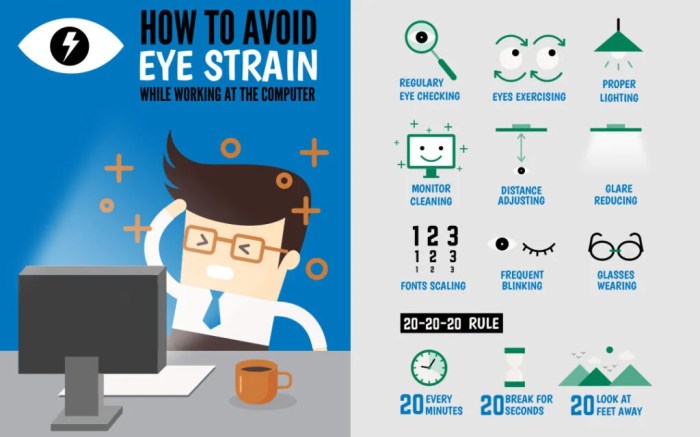
Wrapping up our discussion on managing digital eye strain at home, it's crucial to prioritize eye health by implementing the recommended strategies and habits to ensure a comfortable and strain-free screen experience.
Query Resolution
How can I reduce eye strain while working on screens for long hours?
To reduce eye strain, follow the 20-20-20 rule by taking a 20-second break to look at something 20 feet away every 20 minutes. Also, ensure your screen is at eye level and adjust brightness and contrast settings for comfort.
Does the 20-20-20 rule really help in preventing eye fatigue?
Yes, the 20-20-20 rule has proven effective in preventing eye fatigue by giving your eyes regular breaks from prolonged screen exposure. It helps in reducing strain and maintaining optimal eye health.
What are some recommended eye exercises to alleviate digital eye strain?
Simple eye exercises such as palming, blinking, and focusing on distant objects can help relieve eye strain. Regularly practicing these exercises can improve focus and reduce discomfort.
Is maintaining a balanced diet important for eye health?
Yes, maintaining a balanced diet rich in nutrients like omega-3 fatty acids, vitamins C and E, and zinc is crucial for eye health. Consuming foods like leafy greens, fish, and citrus fruits can promote good eye health.

